

1. Bring in trades
Use manual entry, CSV import, platform webhooks, MetaTrader exporters, crypto exchange sync, or API integrations. The first goal is complete closed-trade history.
A complete operating manual for onboarding, trade history, institutional analytics, Prop Firm Guardian, Pro API access, and the most common fixes. Search, deep-link, and resolve issues without waiting for support.
MetaTrader is the registered trademark of MetaQuotes Ltd. NinjaTrader is a trademark of its respective owner. TradingView is a trademark of its respective owner. VantageGrid is independent and is not affiliated with, endorsed by, or sponsored by these trademark owners.
Try a broader term such as "broker", "CSV", "Guardian", "API", "billing", or "Monte Carlo".
VantageGrid works best when you use it as a closed improvement loop: connect data, review trades, tag behavior, study risk, update playbooks, and enforce guardrails.
Use manual entry, CSV import, platform webhooks, MetaTrader exporters, crypto exchange sync, or API integrations. The first goal is complete closed-trade history.
Tag setup, mistakes, emotion, confluence, session, screenshots, and notes. Context turns a trade log into behavioral intelligence.
Use Institutional Lab, Prop Firm Guardian, AI Coach, Calendar, Replay, and Playbooks to turn data into rules for the next session.
Use the dashboard from top to bottom: operating status, prop-firm risk, core performance, then discipline quality. Do not jump straight to profit without checking whether the process was clean.
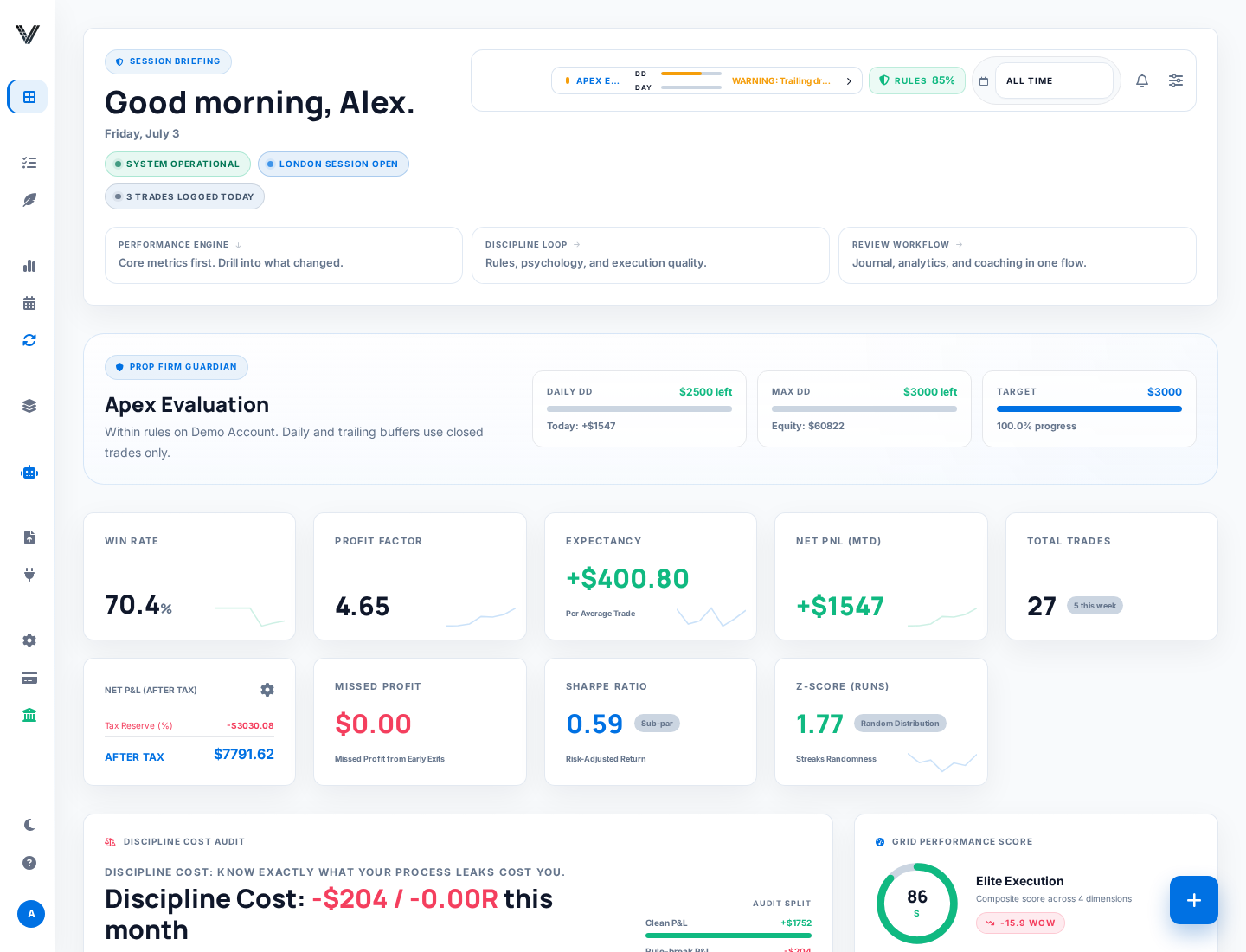
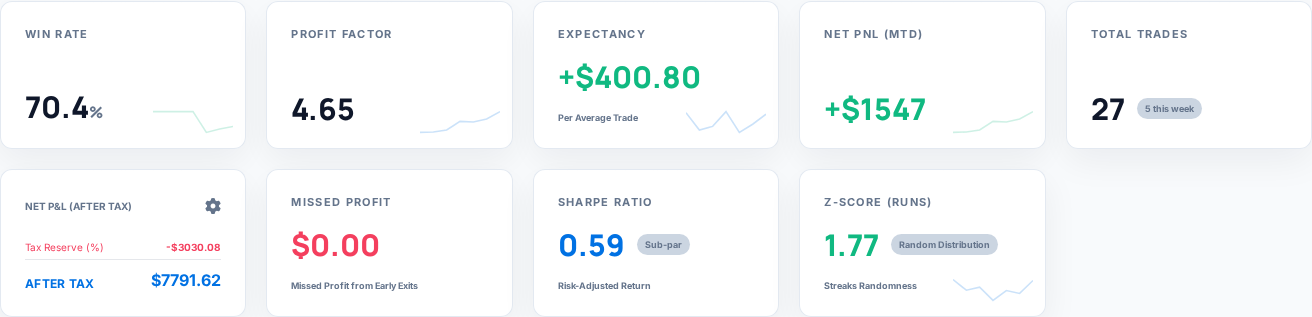
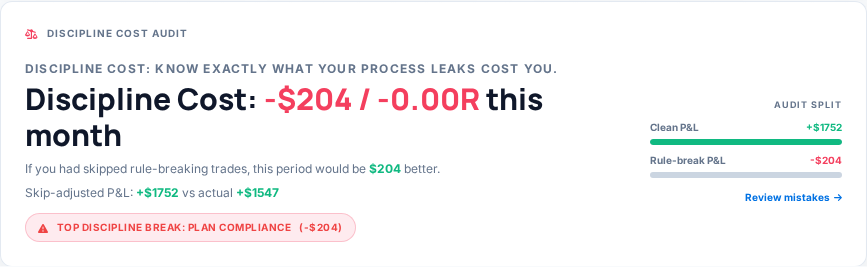
Most dashboard widgets link deeper into the workflow. Use Dashboard for the readout, Journal for trade-level correction, Analytics for pattern work, and Account Settings for data and risk configuration.
Start with the connection type that matches your trading workflow. If a direct connector is not available for your broker, CSV import and webhook/API routes still let you maintain a reliable journal.
For OANDA, verify timezone and fee handling carefully. A shifted timestamp can distort session analysis, daily P&L, and Calendar heatmaps.
VantageGrid stores exchange credentials encrypted at rest. You should still rotate any exchange key that was pasted into the wrong tool or shared externally.
MetaTrader is the registered trademark of MetaQuotes Ltd. VantageGrid is independent and is not affiliated with, endorsed by, or sponsored by these trademark owners.
http://vantagegrid.pro/webhook/mt4http://vantagegrid.pro/webhook/mt4VantageGrid\platform-key.txt. The file is local and unencrypted; protect it and never share it. Missing or invalid files stop startup rather than falling back to another key. Existing logs may still contain a previously entered key.http://vantagegrid.pro/webhook/mt5http://vantagegrid.pro/webhook/mt5VantageGrid\platform-key.txt. The file is local and unencrypted; protect it and never share it. Missing or invalid files stop startup rather than falling back to another key. Existing logs may still contain a previously entered key.Times are derived automatically; no timezone setup is required to send trades. Derived times remain uncertain, especially across historical daylight-saving changes. BrokerTimezone is an optional IANA timezone confirmed by your broker, not your computer timezone.
TradingView is a trademark of its respective owner. VantageGrid is independent and is not affiliated with, endorsed by, or sponsored by these trademark owners.
CSV mapping and templates
API keys and journal sync
Validate imported history
Interface map: first connect data, then validate trades, then add behavioral context.
Do not connect every possible source on day one. Start with the route that produces the most reliable closed-trade history for the account you actually review.
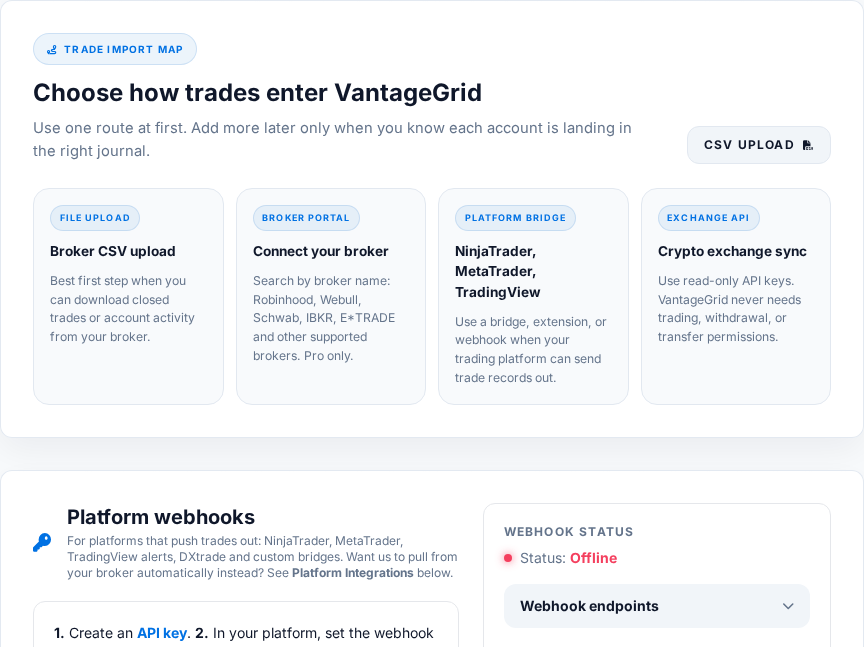
Best for historical accuracy. Upload a closed-trade export, map columns carefully, then compare trade count and P&L against your broker statement.
Best for supported equity/options brokers where read-only history sync is available. Use it when you want less manual file handling.
Best for NinjaTrader, MetaTrader, TradingView alerts, DXtrade and custom webhook workflows. Keep the API key in the platform only.
Best for crypto exchanges. Create read-only keys only; withdrawal, trading and transfer permissions should stay disabled.
If two sources import the same account, check duplicate handling before trusting analytics. Separate account names are safer than mixing prop, personal, crypto and test data into one default account.
Both connect from Account → Integrations and require an active Pro or Desk plan. Both use secure, revocable connections rather than a password you type into VantageGrid.
If a sync ever looks stuck, the Connect page offers a self-service resync for your own cTrader connection so you do not need to contact support for a routine reset.
SnapTrade needs an active paid subscription, not just a trial. Every other Pro feature (including cTrader, TradeLocker, Tradovate and crypto sync) unlocks the moment your 14-day Pro trial starts. SnapTrade specifically checks for a subscription that has already moved to "active" billing, so if you connect a SnapTrade broker during a trial and it is rejected, that is expected — it will unlock once your first payment goes through, not before.
TradeLocker can also be fed through the webhook adapter below if you prefer a push-based bridge instead of stored login credentials.
Every exchange below uses the same read-only, API-key pattern from Account → Integrations → Crypto Exchanges.
| Exchange | What you enter | Sync behavior |
|---|---|---|
| Binance | API key + API secret, generated as read-only in the exchange's own settings. | VantageGrid validates the key live before saving it, encrypts it at rest, and polls for new fills roughly every 30 seconds. |
| Bitget | ||
| Bybit | ||
| Coinbase | ||
| Kraken | ||
| KuCoin | ||
| MEXC | ||
| OKX |
When you create the exchange API key, enable read-only / view permissions only. Do not enable withdrawal, transfer, or trading permissions — VantageGrid never needs them to journal your fills, and leaving them off limits the damage if a key were ever leaked.
Unlike broker/exchange sync and the Pro API, the raw webhook endpoints below are not Pro-gated — they authenticate with the API key inside the JSON body itself, so Free accounts can journal from any of these sources too.
| Endpoint | Platform / use | Notes |
|---|---|---|
| /webhook/log_trade | NinjaTrader AddOn and generic execution posts. | The endpoint used by the VantageGrid AddOn for NinjaTrader documented below. |
| /webhook/mt4 | MetaTrader 4 Expert Advisor. | Normalizes MT4-specific action verbs into standard buy/sell records. |
| /webhook/mt5 | MetaTrader 5 Expert Advisor. | Same normalization as MT4, including SellShort/BuyToCover short handling. |
| /webhook/tradingview | TradingView strategy/alert webhooks. | Requires TradingView Pro or higher for outbound webhook alerts. |
| /webhook/generic | Any platform that can POST JSON. | The universal fallback when there is no dedicated adapter for your tool. |
| /webhook/3commas | 3Commas bots. | Maps 3Commas deal events onto VantageGrid trades. |
| /webhook/cryptohopper | Cryptohopper bots. | Same pattern as 3Commas for Cryptohopper signal/fill events. |
| /webhook/tradelocker | TradeLocker push-based bridge. | Alternative to the stored-login TradeLocker sync above. |
| /webhook/dxtrade | DXtrade / prop-firm forwarders (e.g. Topstep, Apex style platforms). | Include a firm field so the journal labels which prop platform the fill came from. |
| /webhook/heartbeat | Bridge/EA liveness ping. | Powers the "last seen" / sync-online indicator in Account → Integrations. |
| /webhook/update_live_levels | Push updated stop-loss/take-profit for an open position. | Keeps Guardian and open-trade displays current when you move a stop. |
Every URL above (with your account's exact host) is listed pre-filled and copy-pasteable in Account → Integrations, so you never need to type an endpoint path by hand.
| Method | Best for | What to verify |
|---|---|---|
| Manual entry | Small accounts, backfilled examples, missed trades, screenshots, and discretionary review. | Entry, exit, side, quantity, fees, account name, and close timestamp. |
| CSV import | Historical account history from brokers, prop dashboards, OANDA, TradeStation, NinjaTrader exports, and generic broker files. | Column mapping, timezone, duplicate handling, realized P&L, commissions, and account labels. |
| Webhook or platform bridge | Live journaling from NinjaTrader, MetaTrader, TradingView, TradeLocker, DXtrade, and automation tools. | API key, endpoint path, order IDs, heartbeat status, and whether partial fills are matched correctly. |
| Pro API | External AI agents, execution bots, risk pre-checks, and custom operating workflows. | API key security, Pro subscription status, rate limits, and idempotent client behavior. |
After any bulk import, open Reports and Calendar. If the equity curve, daily P&L, and trade count look wrong, fix mapping before adding more data.
Tags are the bridge between what you felt, what you planned, and what happened financially.
Use stable names such as "Opening Range", "VWAP Reclaim", or "Trend Pullback". Do not rename the same strategy context every week or analytics will split the sample.
Mark events such as FOMO, revenge, late entry, early exit, oversized risk, moved stop, no plan, or ignored news. These feed Discipline Cost and Psychology Heatmaps.
Also tag Patience, Following Plan, Correct No-Trade, Reduced Size, and Stopped After Rule Hit. The platform should learn your best behavior, not only your mistakes.
Minimum useful habit: tag every closed trade with one setup tag and one process tag within 24 hours. That is enough to activate most behavioral analytics.
The Journal is where imported and manual trades become reviewable records. Everything below happens on /journal.
The chips above the list split trades into All, Wins, Losses, Mistakes and Missed. The Filter button opens the full filter modal: date range, account, instrument, setup, side, and a minimum/maximum P&L range. An active filter shows a badge count so you never silently review a subset by accident.
Click a trade to open its full record: narrative notes, three tag groups (Psychological Mistakes, Technical Confluence, SMC/ICT model tags), setup, sentiment, execution emotion, plan compliance (the field Discipline Cost reads), stop-loss/take-profit, and account name. Save writes everything at once.
Attach chart screenshots (PNG, JPEG or WebP) to any trade from the same modal. Thumbnails show in a strip; click one for a full-screen lightbox. A counter on the button shows how many are attached.
The Share button in the trade modal creates the public read-only link described under Trade sharing.
Basic notes and journal search are available on Free so every trader can find earlier context. Pro adds deeper behaviour patterns, full performance ranges and the Discipline Leak Report. The Daily Journal panel gives every trading day its own free-writing space with autosave and one-tap mood chips (Focused, Calm, Confident, Anxious, Frustrated, Tired).
Log a setup you saw but did not take via the Missed chip: instrument, setup, and a short note on what stopped you. Missed trades are tracked separately — they never touch your P&L, but they feed the Missed Profit widget so hesitation becomes measurable.
Next to the Trade List sits the Pivot Grid: an aggregate table that groups all your trades by Strategy Context, Asset, Day, Side or Quality, with win rate, average win/loss, net P&L and a Kelly % per group. Click any column header to sort. It is the fastest answer to "which bucket is actually carrying my results?".
Add Trade is the fastest route for discretionary traders and backfills. Free accounts can log up to 25 trades per month this way (shared with CSV import).
Instrument, buy/sell, entry price, exit price, quantity, commission and account name. Add setup, technical confluence, SMC/ICT tags, sentiment and execution emotion in the same form so the trade lands fully tagged instead of needing a second pass later.
Optional sleep, hydration and focus self-ratings are stored with the trade and feed the Trade Permission readiness score — the same three fields external bots can pass through the Pro API.
Enter account size, entry, stop and risk percentage and the built-in calculator returns the dollar risk and the position size that matches it — before you commit the numbers to the journal.
The form shows your live Trade Permission verdict (go / conditional / reduce, with score and suggested size multiplier) while you fill it in. It needs closed trade history first; a brand-new account sees "SETUP NEEDED" until trades exist.
New accounts can load a clearly-labeled demo dataset (about two dozen sample trades) from the welcome flow or the empty dashboard, so every chart and widget has something to show before your own history arrives.
Everything account-level lives in one place. Settings are organized by purpose: Account, Trading, and Data & business. All three groups stay visible in the desktop sidebar, with the same groups and names in the mobile Settings section menu. Security & 2FA is directly accessible under Account.
| Group | Tab | What it's for |
|---|---|---|
| Account | Profile | Read-only name/email (contact support to change either), your membership plan card linking to Billing, the Public Profile toggle and URL, and your bio. |
| Account | Security & 2FA | 2FA setup/removal, backup recovery codes, and password change. See the Account Security section above for the full walkthrough. |
| Account | Notifications | Desktop, Telegram, email and sound alert preferences. See the Notifications section below. |
| Account | Privacy Mode | A browser-only toggle that blurs financial figures on screen. |
| Trading | Integrations | Every broker, exchange, platform bridge and CSV import route lives here, including connect/disconnect controls and copy-paste webhook URLs. |
| Trading | Risk Guard | Personal risk limits or full Prop Firm Guardian configuration (drawdown type, consistency rule, profit target and more). |
| Trading | Journal Tags | Customize the five tag sets used across the journal, with a one-click reset to defaults. |
| Trading | API Keys | Create/revoke your VantageGrid API key (used for both platform webhooks and the Pro API) and manage outbound AI webhooks. |
| Data & business | Financials | One field: your Expected Tax Rate (%), which feeds the Tax Reserve page. |
| Data & business | Exports | Pro-gated CSV, Excel and JSON exports, plus a pointer to the Tax PDF. |
| Data & business | Social & Gamification | Public pseudonym and the separate Global Leaderboard opt-in. |
| Data & business | Partner Program | A compact view of your referral link, referrals, conversions and credit days, linking to the full Partner Program page. |
Before upgrading or connecting external tools, confirm that account recovery and authentication are clean. A trading journal can become operational infrastructure, so treat access seriously.
Backup codes are single-use recovery codes for losing access to your authenticator. VantageGrid stores them encrypted at rest and only shows them after password confirmation.
Use a unique password, avoid shared team logins, and rotate the password immediately if you suspect browser, email or machine compromise.
API keys are not login passwords. Revoking an API key does not log out a browser session; changing password or logging out bumps session token version so copied browser tokens stop working.
Always on. Your browser will ask for permission the first time; allow it if you want in-browser alerts while VantageGrid is open in a tab.
Message @userinfobot on Telegram to get your numeric chat ID, then paste that ID into Notifications. VantageGrid cannot look this ID up for you; it only works once you have it from Telegram itself.
Always on and cannot be disabled. These cover Guardian breach warnings and account-security notices, so they are treated as safety-critical rather than optional.
Weekly AI Recap, Product Updates, Performance Milestones (email), Trade Execution Alerts, Review Reminders, Sound Notifications (a ping on new trade events), and Streak Milestones can each be switched on or off independently.
Newsletter vs. account emails: the marketing newsletter is a separate double-opt-in list — subscribing sends a confirmation link you must click before anything else arrives, and every newsletter contains a one-click unsubscribe that takes effect immediately. Unsubscribing from the newsletter never stops account, security or billing emails; those follow the toggles above (and the always-on safety alerts).
Account → Exports offers CSV, Excel (.xlsx) and JSON exports of your journal. The Tax PDF export lives on the Tax Reserve page, not in this tab.
Canceling your subscription (Billing → Cancel) only stops future charges and drops you back to the Free plan. It does not delete anything — your trades, tags, notes and screenshots stay exactly as they were.
In the Android app, open Account → Delete account and data, confirm the store-billing notice, and enter your password. If you cannot access the app, use the public deletion request page. Deleting VantageGrid does not cancel a Google Play subscription; cancel that separately in Google Play first. Minimal legal, billing, security, suppression, or audit records may be retained as described in the Privacy Policy.
Your timezone is set automatically once, during onboarding, and is not yet user-editable from Account Settings. A display-currency setting is also not available today. If either is wrong for your account, contact support — it is a quick manual correction on our side.
When an imported fill reports a fee in the traded base asset, VantageGrid converts it using that execution's price. Other currency conversions use daily accounting reference rates, which can differ from your broker's execution rate. Fiat rates come from Frankfurter. Supported crypto rates use Binance market prices and observed Kraken USDT/USD or USDC/USD prices; stablecoins are not assumed to equal one dollar. Crypto conversions for the current day use the preceding completed UTC day. Missing or unsupported historical rates stop the import for review instead of producing estimated totals.
Web billing state is synchronized from Stripe. Android subscription access is synchronized from Google Play through RevenueCat. Manage renewal and cancellation with the provider where you purchased.
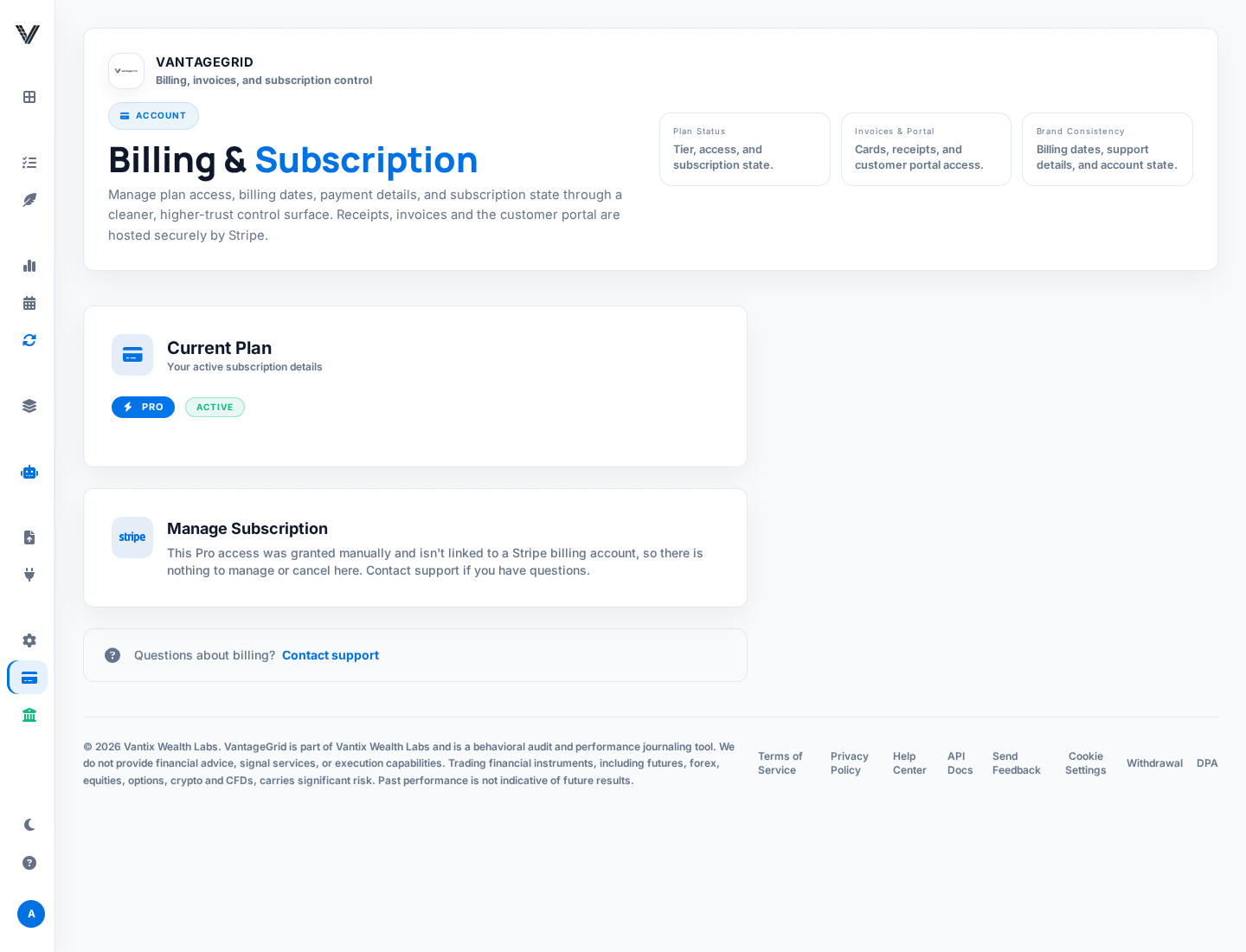
First-time eligible subscribers receive a 14-day Pro trial. The trial requires verified email and is not reusable after a prior subscription status exists.
Cancel web purchases from Billing and Android purchases from Google Play subscriptions. During a trial, cancellation prevents renewal while access may continue until the trial end.
The first paid subscription has a voluntary 14-day money-back guarantee. Contact support from the account email with the Stripe receipt or Google Play order number; store purchases may also use Google Play's refund process.
If payment succeeded but Pro is missing, restore purchases in the app and sign out/in. If it still looks wrong, include account email, approximate payment time, provider and subscription status.
This is the full comparison behind the Pricing page, including the operational quotas that are easy to hit and hard to find documented anywhere else.
| Included | Free | Pro | Desk |
|---|---|---|---|
| Price (founding launch rate) | €0 | €19/mo or €179/yr | €39/mo or €384/yr |
| Eventual list price | €0 | €29/mo | €49/mo |
| Trades per month | 25 (manual or CSV) | Unlimited | Unlimited |
| AI Vision chart reviews | 5/month | 50/month | 200/month |
| Trade Replay windows | 0 | 50/month | 150/month |
| Active Playbooks | 2 | Unlimited | Unlimited |
| Broker/platform sync (beta), AI Coach, Pro API | — | ✓ | ✓ |
| Prop Firm Guardian | — | Single account | Multi-account fleet, per-account rules |
| Discipline Cost, Equity Curve, Tax Reserve, full exports | — | ✓ | ✓ |
| Monte Carlo, Asset Correlation, Psychology Heatmaps | — | — | ✓ |
| Public trading profile with performance stats, priority support | — | — | ✓ |
| Calendar heatmap, AI Strategy Insights on Playbooks | ✓ | ✓ | ✓ |
The 14-day Pro trial unlocks everything in the Pro column immediately, including the Pro API and AI Coach. The one exception is SnapTrade broker connections, which require billing status to have already moved to "active" — see the SnapTrade note above.
Use the top status area for market session, sync state, trade count, Guardian status, and account context. It is designed for fast scanning before and during a trading session.
Win rate, profit factor, expectancy, P&L, drawdown, and quality score show whether the edge is healthy. Use them together, not in isolation.
Review mistake costs, live session coach, circuit breaker, mission plan, and trade permission before taking new risk.
Use Dashboard for monitoring, Trades for trade-level review, Analytics for deeper analysis, Playbooks for rules, and AI Coach for synthesis.
The dashboard is fully customizable: drag widgets by their handle to rearrange, and use edit mode to hide any widget (hidden ones collect in a "Hidden Widgets" tray for restoring). The small ⓘ on each widget links straight back to this glossary. All widgets respect the account switcher.
| Widget | What it tells you |
|---|---|
| Win Rate | Percentage of closed trades that ended positive. Read it together with Profit Factor — a low win rate can still be very profitable with large winners. |
| Profit Factor | Gross profit divided by gross loss. Above 1 means winners outweigh losers; "inf" appears when there are no losers yet (small sample). |
| Expectancy | Average dollar result per trade. The single best "is my edge real?" number once the sample is big enough. |
| Net PNL (MTD) | Net profit and loss for the current period (month-to-date by default), after fees. |
| Total Trades | Closed trade count, with this week's count as context for whether other stats rest on enough data. |
| Net P&L (after tax) | Your P&L after applying the Expected Tax Rate from Account → Financials. The gear icon jumps straight to that setting; see Tax Reserve. |
| Missed Profit | Estimated P&L left on the table by logged missed trades and early exits. Fed by the Missed chip in the Journal. |
| Sharpe Ratio | Risk-adjusted return using total volatility. Compare with Sortino in the risk math reference. |
| Z-Score (Runs) | Statistical test for streakiness: whether wins/losses cluster more than chance would predict, which matters for sizing after a streak. |
| Discipline Cost Audit | Clean P&L versus rule-break P&L. Full explanation under Discipline Cost. |
| Grid Performance Score | A single composite health score for your recent trading, blending edge, risk and discipline signals into one gauge. |
| Fix This First | The one highest-impact problem detected in your recent data, ranked by severity, so improvement effort goes where it pays most. |
| Mission Plan | Today's operating orders: the concrete focus derived from your recent behavior and rules. |
| Strategy Context Intelligence | Your best-performing setup right now, with its supporting stats — the data-backed answer to "what should I trade more of?". |
| Trade the Right Environment | Market-context guidance: which conditions (session, volatility regime) historically suit your edge. |
| AI Insights | Hourly-refreshed AI observations about your recent trades. The deeper version lives in AI Coach. |
| Trade Permission | The go / conditional / reduce verdict with score and size multiplier — the same engine behind the Add Trade gate and the Pro API's guardian-validate. |
| Session Debrief | An end-of-session summary of what happened and what to write down before closing the laptop. |
| Live Coach | In-session nudges based on what you are doing right now (streaks, pace, rule proximity). |
| Circuit Breaker | Your configured hard-stop conditions for the day and how close you are to tripping them. |
| Tilt Meter | A live estimate of emotional risk based on recent results and behavior patterns — high tilt is the signal to step away. |
| Performance Heatmap | Compact win/loss intensity view across time buckets. |
| Daily P&L Calendar | Mini version of the Calendar heatmap, embedded on the dashboard. |
| Time of Day Zone | When during the day you actually make (and lose) money. |
| Market Sessions | Which global sessions (New York, London, Tokyo) are open right now. |
| Health vs P&L | Correlates your logged sleep/hydration/focus ratings with results — the payoff for filling in the wellness fields. |
| Accounts | Per-account breakdown of closed journal records, for traders running multiple account names. |
| Fleet View Desk | All prop-firm accounts in one cockpit with per-account rule status. Desk tier — see Plans & limits. |
| Exposure Desk | Net open exposure clustered across accounts and assets; the widget version of Asset Correlation. |
Discipline Cost separates clean process from rule-breaking process. It answers: "How much better would this period look if I removed avoidable mistakes?"
Trades that followed plan/compliance rules. This is your cleaner baseline and the part of performance most worth scaling.
Trades marked with failed plan compliance or high-cost mistake tags. A profitable rule-break still counts as dangerous because it reinforces bad behavior.
A what-if view that removes rule-breaking trades. Use it to decide whether reducing trade frequency would improve results.
Open the journal and inspect the trades behind the widget. Fix tags if they are wrong; write a rule if they are right.
The Institutional Lab turns trade history into risk-adjusted, behavior-aware analytics. It is not just "how much did I make?" It is "was the process durable enough to scale?"
Sortino, drawdown, risk of ruin, tail behavior, and recovery factor show whether returns are stable enough to trust.
Strategy Context Intelligence, Strategy Lab, session windows, and market-regime analysis reveal where the edge actually appears.
Psychology Heatmaps, mistake leaks, quality grades, and daily journal context reveal whether the trader is executing the plan.
Tier split: Strategy Context Intelligence, Strategy Lab, Discipline Cost and the equity curve are Pro. Monte Carlo, Asset Correlation and Psychology Heatmaps specifically require Desk — see Plans & limits.
Sortino is a risk-adjusted return metric that focuses on downside volatility instead of all volatility. A strategy with choppy upside and controlled downside can look better on Sortino than on Sharpe.
Sortino = excess return / downside deviation
Kelly estimates the theoretical growth-optimal fraction of capital to risk when win probability and payoff ratio are known. In practice, traders usually use fractional Kelly because full Kelly can produce severe drawdowns.
Kelly = W - ((1 - W) / R)
Risk-of-ruin estimates the chance that normal variance pushes the account past a failure threshold. In VantageGrid this can be modeled through Monte Carlo paths and Guardian drawdown limits.
If P&L is positive but Sortino is poor, Kelly is extreme, or risk-of-ruin is high, the strategy may be profitable but fragile. Reduce size, tighten rules, or collect more data before scaling.
The engine samples from your historical closed-trade returns with replacement, then generates many possible future trade sequences. It asks: if your edge behaves like the past, what account paths are plausible?
This is the percentage of paths where drawdown breaches the configured danger threshold. If it is above your tolerance, reduce risk per trade or tighten stop conditions.
The 50th percentile outcome. It is more useful than the average when extreme outliers distort the mean.
Best case and worst case use percentile bands. Treat the 5th percentile as a serious planning scenario, not an impossible disaster.
Monte Carlo fan chart reading: focus on the lower band and maximum drawdown, not only the best path.
Monte Carlo is a Desk-tier feature. Pro unlocks the rest of the Institutional Lab but not this simulator — see Plans & limits.
Higher highs, controlled drawdowns, stable trade frequency, and recoveries that do not require oversized wins.
Flat or falling curve while trade count rises, larger losses after winning streaks, or profit concentrated in only one day or one setup.
Equity drops that coincide with tags like FOMO, revenge, no plan, or oversized risk usually point to process failure, not market randomness.
Reduce size, pause weak setups, review Replay, write a Daily Journal debrief, and require Playbook compliance before returning to normal risk.
Psychology Heatmaps group closed trades by tags such as FOMO, Revenge, Patience, Following Plan, Hesitation, or Moved Stop. For each tag, VantageGrid calculates trade count, net P&L, and win rate.
Psychology Heatmaps are a Desk-tier feature — see Plans & limits.
If the radar is empty, add tags to closed trades. The feature needs enough journal data to separate real patterns from noise.
Asset Correlation inspects open trades and estimates net exposure by base and quote asset. For example, long EUR/USD adds EUR exposure and short USD exposure. Multiple positions can quietly create a concentrated USD, JPY, crypto, or index bet.
You are net long that asset across open positions.
You are net short that asset across open positions.
If exposure exceeds a threshold, the Guardian warns that one news event could hit several trades at once.
The correlation matrix highlights instruments that often move together or hedge each other.
Asset Correlation is a Desk-tier feature — see Plans & limits.
Calendar is a GitHub-style heatmap of the last 26 weeks. Unlike most of the Institutional Lab, this one is available on every plan, including Free.
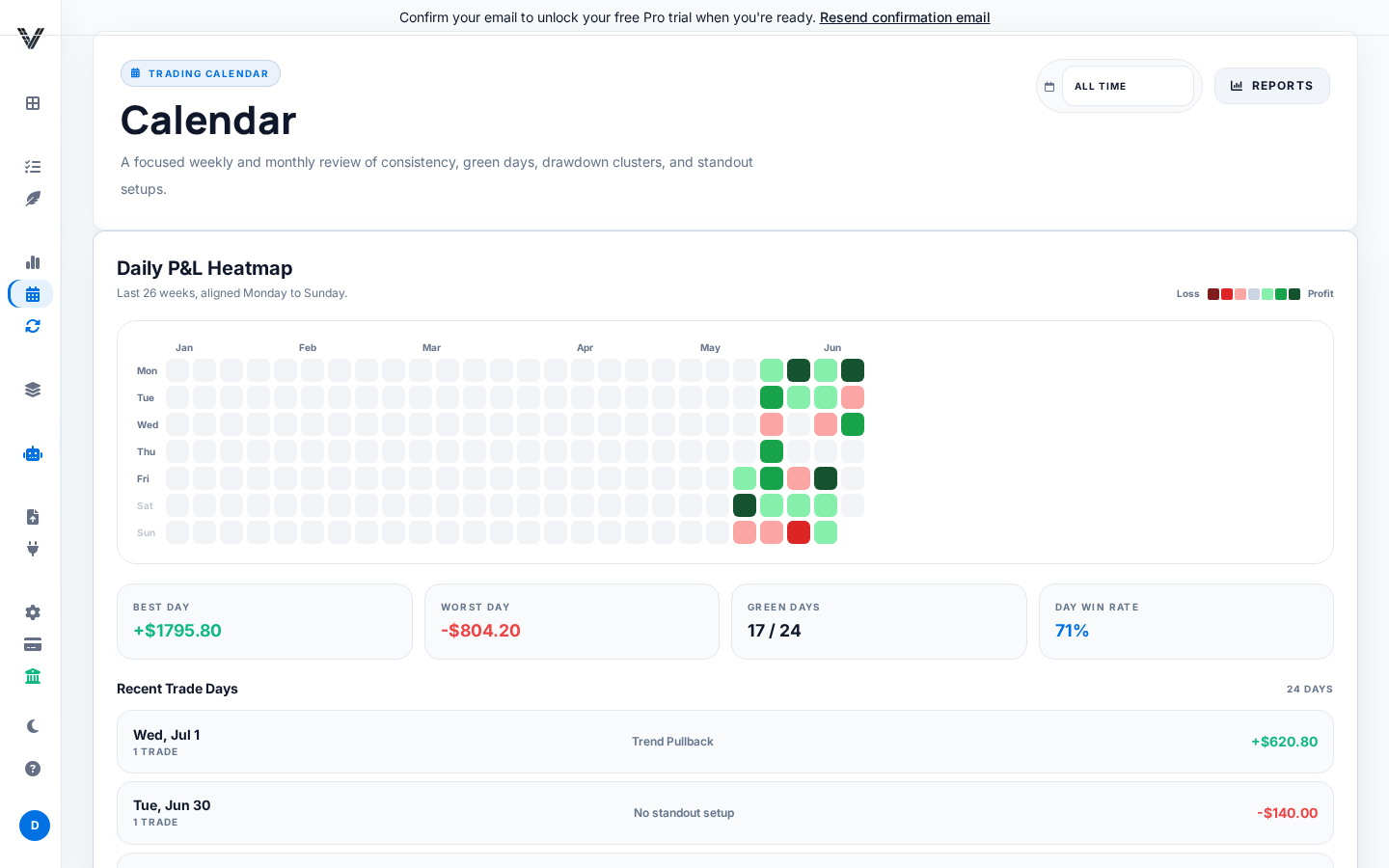
Each cell is one trading day, colored on a seven-step red-to-green scale by that day's net P&L. Hover any day for its exact dollar result, trade count, and best setup.
Best Day, Worst Day, Green Days (as a fraction of trading days) and Day Win Rate summarize the grid without you needing to scan every cell.
A list of your last 10 traded days with date, trade count, best setup, and signed P&L — a fast way to jump back into a specific day's detail.
The account switcher and analysis-range control at the top of the page apply to Calendar too, so a multi-account trader can isolate one account's heatmap at a time.
An empty grid links straight to the Journal — Calendar has nothing to show until at least one trade is closed.
A Playbook is a name, a description, and an ordered list of plain-language rules, such as "Price is above the 200 EMA" or "Risk is 1% or less."
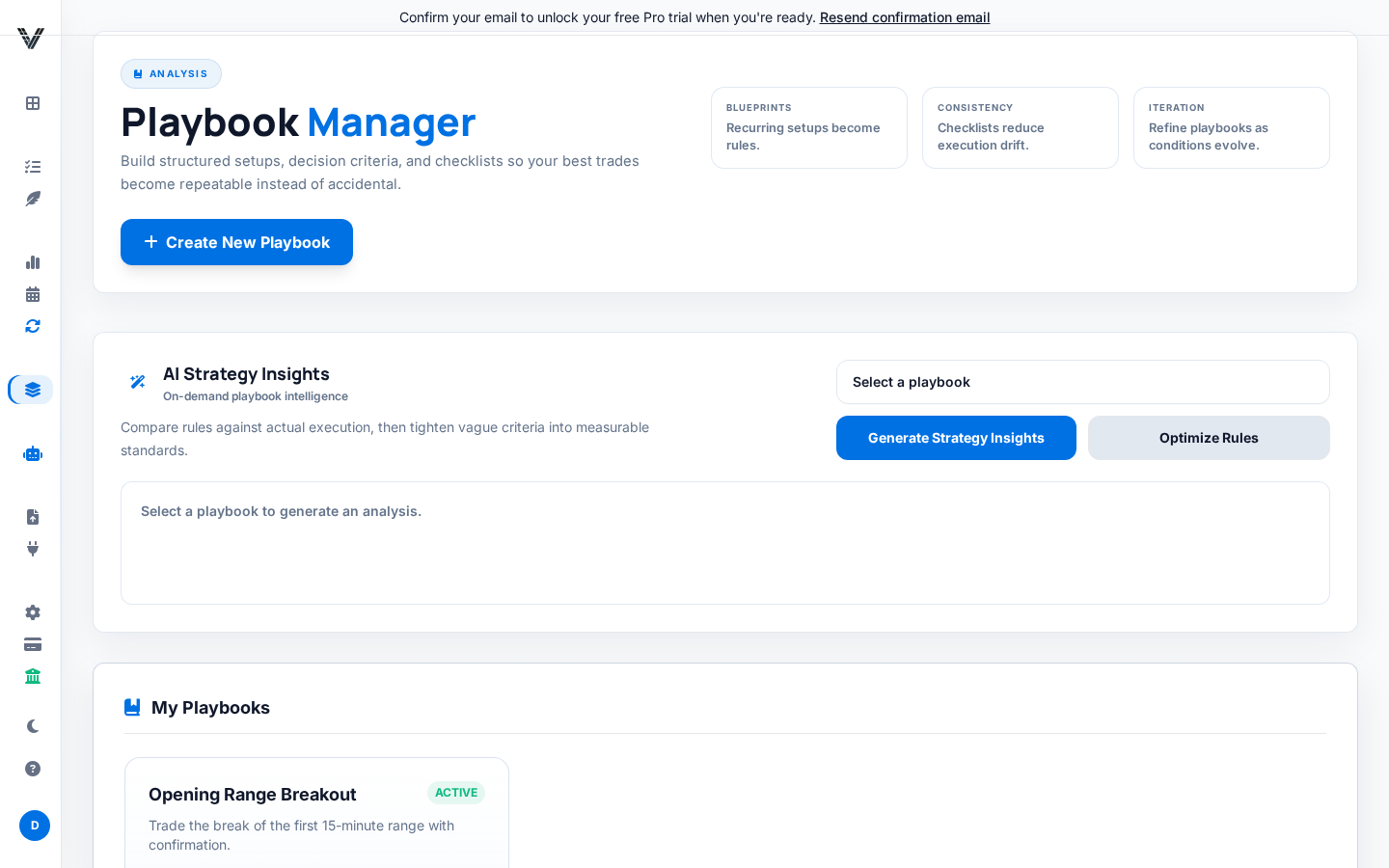
When a trade references a playbook, checking off which rules were actually followed produces a discipline score for that trade. This is the raw data behind the Discipline Cost widget.
From the Playbooks page, pick a playbook and choose Generate Strategy Insights for a headline read on blind spots and risky rules, or Optimize Rules for tightened rule wording. Both work on every plan, including Free.
Free plan limit: up to 2 active playbooks. Deleting a playbook deactivates it rather than erasing the history already tied to past trades, so old scoring stays intact even after you retire a playbook.
AI Coach lives at /ai-coach. Older links to /copilot and /pro/coaching still work — they redirect straight here, so any bookmark or saved link from before still lands in the right place.
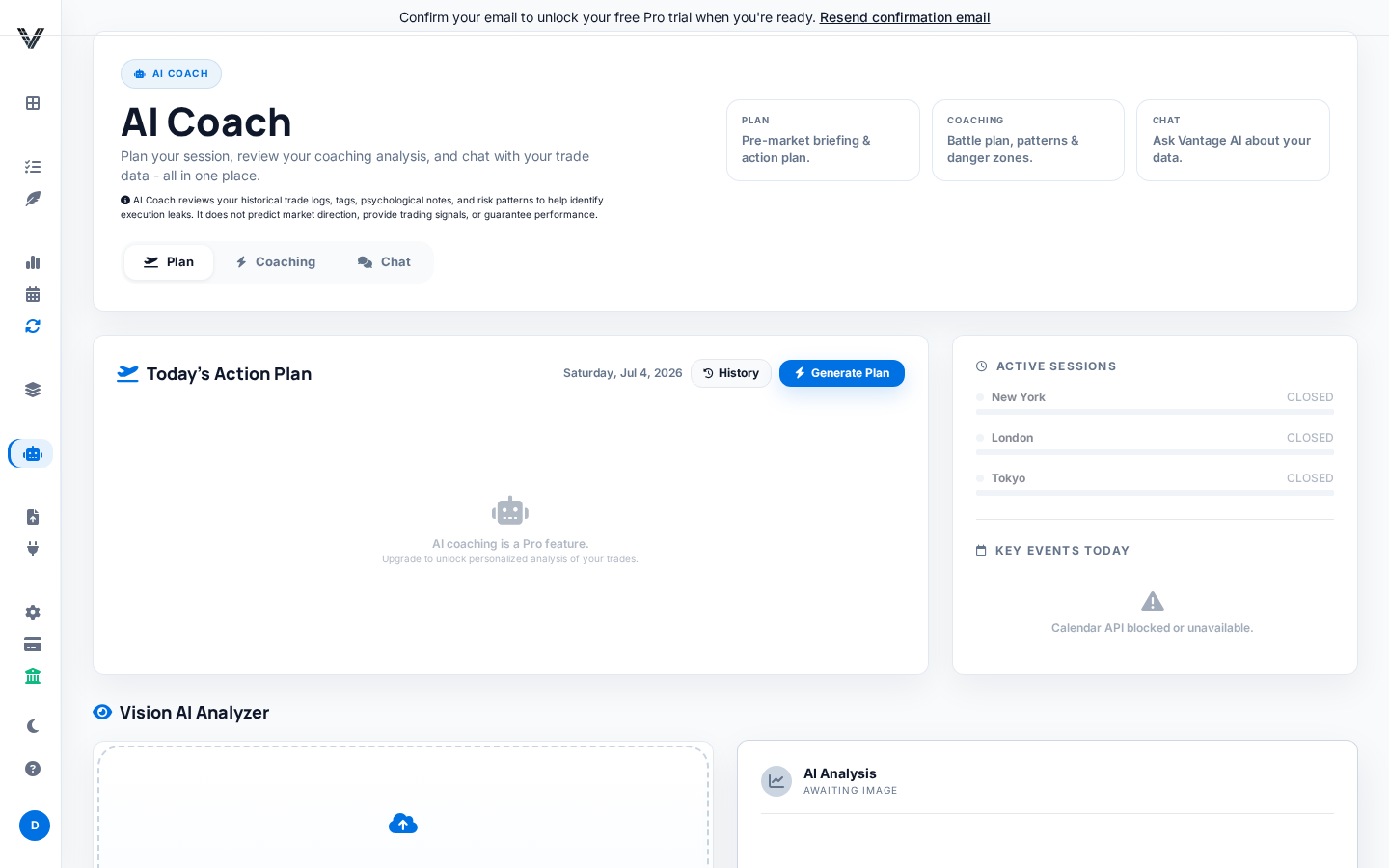
Pre-market action-plan cards, a Live Cockpit showing active trading-session windows and an economic calendar, and the Vision AI Analyzer for uploading a chart screenshot for AI feedback. Viewing the tab is free; Generate Plan itself requires Pro.
Your Daily Battle Plan, a history of Guardian Interventions, an Execution Flow link into Analytics, and Danger Zones showing which days or hours have historically clustered your losses.
A grounded chat that reasons over a snapshot of your own last 60 trades and key stats. Limited to 10 messages/minute, 2000 characters per message, and a 6-turn visible history. It is explicitly framed as educational, not financial advice.
| Vision AI chart reviews | Free | Pro | Desk |
|---|---|---|---|
| Monthly credits | 5 | 50 | 200 |
The credit window rolls roughly 30 days from your last reset, not the calendar month. If an analysis fails outright, the credit is automatically refunded rather than wasted.
Trade Replay steps through real historical candles around one of your closed trades — it replays what actually happened, it does not simulate a hypothetical strategy against history the way a backtester would.
Next Bar, Auto-play, Show All and Zoom to Trade let you move through 1m/5m/15m/1h candles at your own pace. Entry, exit, stop-loss and take-profit markers reveal as the replay reaches them.
After the trade plays out, a summary shows Result, Maximum Favorable Excursion (MFE), Maximum Adverse Excursion (MAE), and Capture % — how much of the available move you actually captured.
A sidebar recommends specific past trades worth re-studying, so Replay is not only for trades you already flagged yourself.
Free has none; Pro includes 50 replay windows a month; Desk includes 150.
Trade Replay is still rolling out in stages. If you are on Pro or Desk and still see an "in development" teaser instead of the real replay, it is not yet enabled for your account rather than a broken purchase — contact support to check, and use Discipline Cost plus manual screenshot review in the meantime.
These are two independent toggles in Account Settings. Turning one on does not turn on the other, and that mismatch is the most common point of confusion here.
Account → Social & Gamification → "Opt-in to Global Leaderboards" plus a public pseudonym. Ranking is year-to-date, on closed, non-demo trades, sorted by streak and win rate. Only percentages and rates are shown — raw dollar P&L never appears on the leaderboard. Without opting in, you are listed as a "Ghost."
Account → Profile → "Enable public profile" is what makes your vantagegrid.pro/u/<username> page resolve at all. It shows Total Trades, Win Rate, Profit Factor, Current Streak, your top setup by win rate, and a 30-day equity curve in percentage terms — again, never raw dollars.
You can appear on the leaderboard as a Ghost without a public profile page, or have a live public profile page without appearing on the leaderboard. Turn on both if you want a visible name that links through to a real page.
From any trade, choose Share to generate a public, read-only link. Calling Share again on the same trade reuses that link rather than creating a duplicate.
Instrument, long/short, net P&L, R-multiple, entry/exit, size, quality grade, whether the plan was followed, setup/sentiment/execution tags, and your notes.
Account name, broker identity, and fee breakdown are deliberately left out of the shared page, by design, regardless of what is visible to you privately.
Revoke a link any time from the same trade. A revoked or unknown link shows the same generic "no longer available" message either way, so a dead link cannot be used to confirm whether a trade ever existed.
Shared trade pages are hidden from search engines by design and will not appear in Google or other search results.
The Tax Reserve page (Analytics → Tax Reserve, or /pro/tax) is an estimation tool, not tax advice. Always confirm real figures with a qualified tax professional before relying on them.
Go to Account → Financials and enter your Expected Tax Rate (%). Until you do, this page shows a red "Reserve Rate Not Configured" banner and defaults to 0%.
An Estimated Net Performance %, an Estimated Tax Reserve, Net Take-Home YTD, and Gross YTD, plus a Quarterly Fiscal Summary table.
Each quarter row is calculated standalone, with no loss carried over from another quarter. The year-to-date total, by contrast, nets losing quarters against winning ones before applying your rate. Both are correct — they are simply answering different questions.
A Tax PDF export is available directly from this page for the selected year.
Open Affiliate/Partner Program to get an auto-generated referral link in the form vantagegrid.pro/?ref=YOURCODE.
Claim a custom slug (lowercase letters, numbers and hyphens, 3-50 characters) for a cleaner link such as vantagegrid.pro/join/yourslug.
Each Pro signup through your link earns you 30 free days of Pro access, credited automatically as Credit Days — not a cash payout.
Your Partner Program page shows Referrals (signups via your link), Conversions (referrals who became active or trialing Pro/Desk), and your running Credit Days balance.
VantageGrid has several operational limits so expensive features remain reliable. Most limits reset automatically; Pro removes the core journaling caps.
| Area | Where to find it | What to know |
|---|---|---|
| Trade exports | Analytics, Journal and Account → Exports | Use CSV for accountant/broker reconciliation and PDF-style reports for review meetings. |
| AI chart review credits | AI Coach / Vision workflows | 5/month on Free, 50/month on Pro, 200/month on Desk. See Plans & limits. |
| Trade Replay | Replay / Drills | 0 on Free, 50/month on Pro, 150/month on Desk, while market-replay data is in beta. |
| Pro API rate limit | External `/api/v1/...` clients | Design agents for 60 requests per minute and back off on 429 responses. |
| Sync cleanup | TradingView extension cleanup endpoint | Delete bad extension batches carefully; cleanup is intentionally more restrictive than sync import. |
Before exporting for tax or prop-firm review, filter by the correct account and date range, then compare total P&L and trade count against your broker statement.

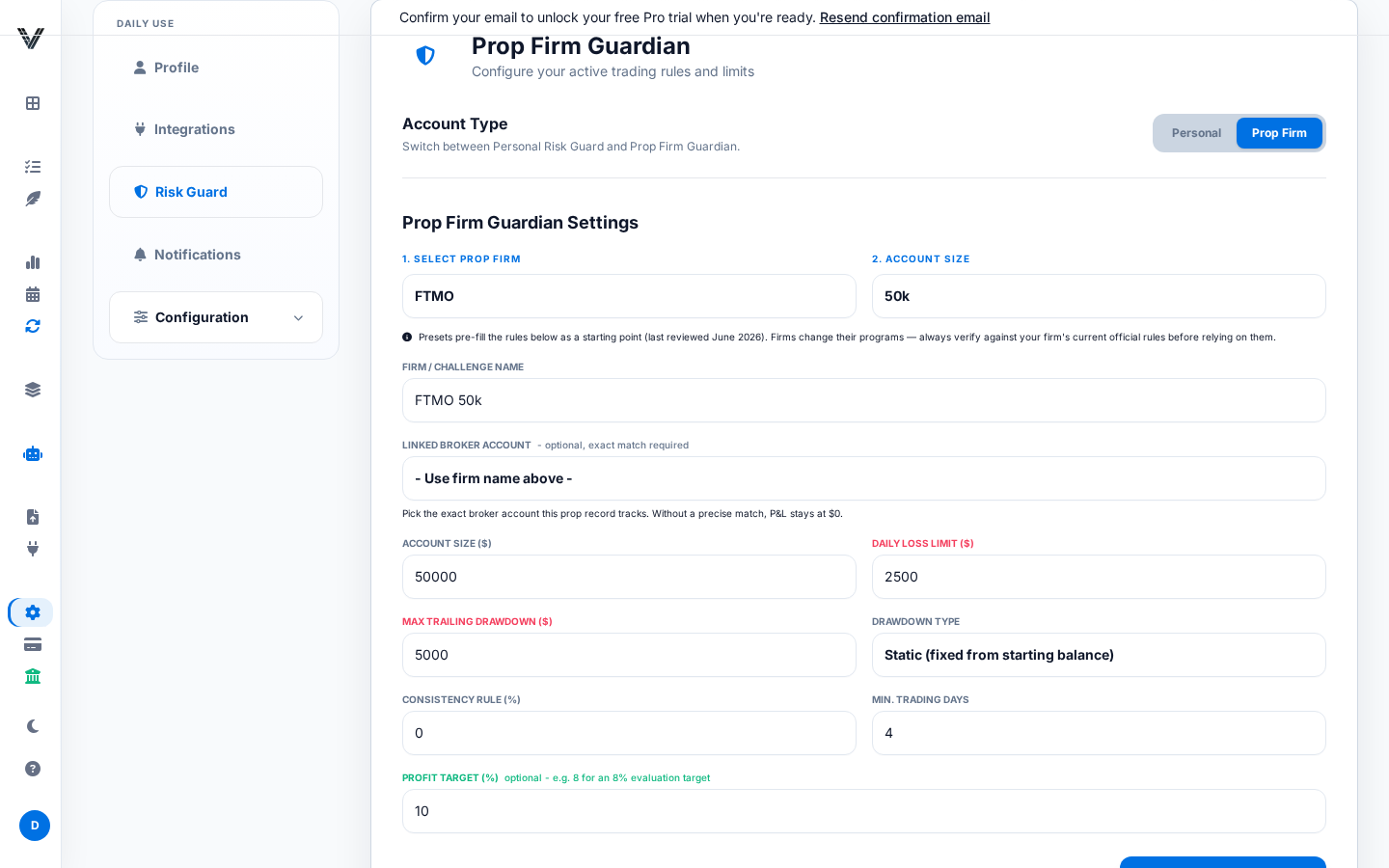
FTMO rules often focus on daily loss, maximum loss, and profit target. Topstep and MyFundedFutures-style accounts often require careful trailing drawdown handling. Always enter the exact rules from your current account contract.
Create separate Prop Firm accounts for each challenge or funded account. Do not combine personal and prop data if the rules are different.
Check Guardian status before the session, after each large trade, and near the daily loss threshold. If a rule changes, update the account before the next trade.
Pro includes Guardian for a single account. Desk adds the multi-account Prop Fleet view with independent rules and drawdown tracking per funded account — see Plans & limits.
Guardian Lock is a risk-control state. When current P&L, drawdown, or configured risk rules approach a dangerous area, VantageGrid can warn you, mark trade permission as unsafe, and return a denial from Pro API Guardian checks.
Guardian Lock is a guardrail, not a broker-side kill switch unless you explicitly wire your own execution system to honor it. If your platform can still place trades, you are still responsible for stopping.
VantageGrid is monitoring and intelligence software. It depends on the data it receives from your broker, platform, bridge, webhook, browser, network, and server. During fast markets or outages, data can be delayed, incomplete, duplicated, or unavailable.
The Pro API lets trusted AI agents and automation clients retrieve compact trading context and validate proposed trades before execution.
Full API documentation is in this Help Center. The interactive Swagger UI is only available in development environments; on production it redirects here.
Every external endpoint lives under /api/v1, authenticates with the same vgai_ API key, and requires an active or trialing Pro/Desk subscription. Rate limits are per client IP, so keys behind a shared network address share a bucket while one key rotating IPs receives separate buckets.
| Endpoint | What it does | Limit |
|---|---|---|
| GET /ai-context | Compact, LLM-ready summary of your recent performance, psychology and Guardian state. Documented in full below. | 60/min |
| POST /guardian-validate | Pre-flight a proposed trade against Guardian, risk rules and the Permission score. Documented in full below. | 60/min |
| GET /prop-risk/fleet | Open-exposure clusters across your active prop-firm accounts — the API view of the Desk Prop Fleet. | 60/min |
| POST /trades/sync | Bulk-import closed trades (up to 250 per call) — the endpoint the TradingView browser extension uses. Deduplicates by trade shape; rows with impossible close times are skipped, not fatal. | 60/min |
| GET /trades/sync/latest | Inspect your most recent extension imports (diagnostics after a sync). | 60/min |
| DELETE /trades/sync/imports | Delete specific extension-imported trades by ID (cleanup of a bad batch); can only ever touch your own extension imports. | 20/min |
| POST /trades/omni-sync | Universal Omni-Importer: import mapped rows collected from a broker's web table or export page. | 60/min |
| GET /import-blueprints/lookup / POST .../learn | Fetch or contribute a crowdsourced import "blueprint" (structure + column mapping only, no personal data). A blueprint stays a candidate until a second, different user confirms the same structure. | 60 / 30 per min |
| POST /trades/pdf-upload | PDF import is not implemented. This reserved endpoint returns 501 and does not accept, store or queue files. | 20/min |
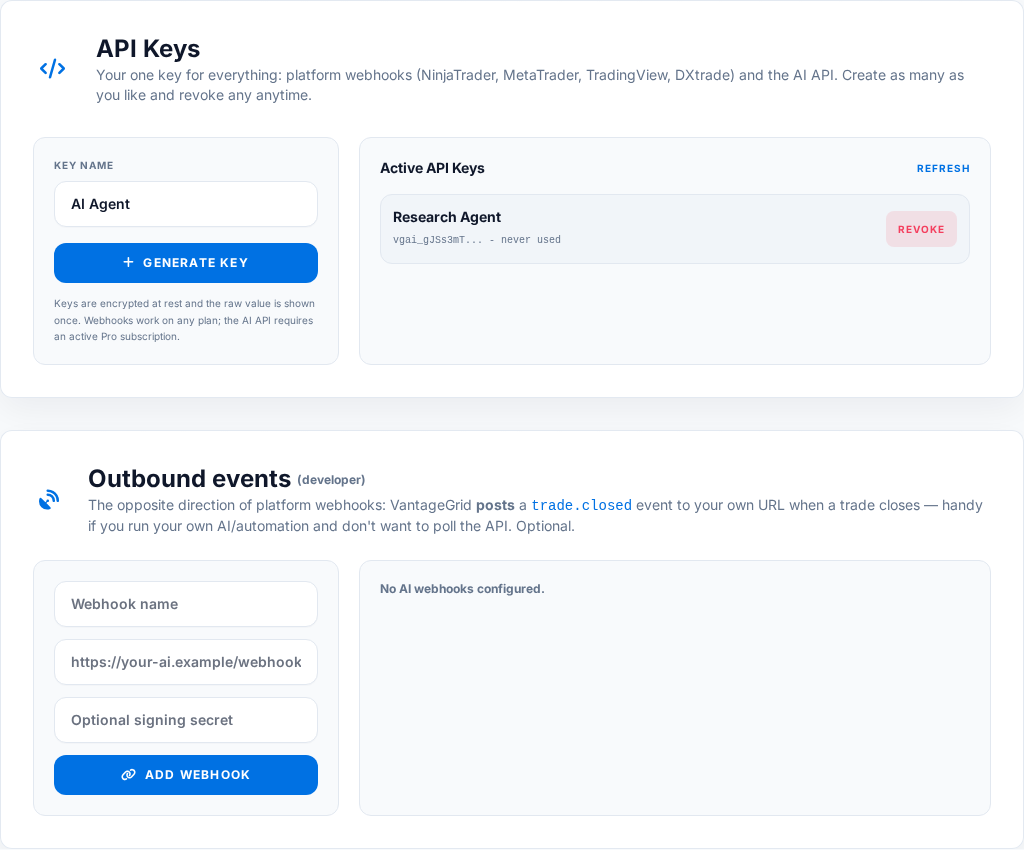
Authorization: Bearer vgai_your_api_key_here
X-VantageGrid-API-Key: vgai_your_api_key_here
VantageGrid stores Pro API keys using hash-based lookup and encrypted storage. You still must treat the visible key as a secret because anyone holding it can call your Pro API until it is revoked.
This is the opposite direction from everything else in this Pro API section. The API key and platform webhooks above are for VantageGrid receiving data. Outbound AI webhooks are for VantageGrid sending a notification to a URL you control the moment a trade fully closes.
{
  "event": "trade.closed",
  "schema": "vantagegrid.webhook.v1",
  "timestamp": "2026-07-04T14:32:00+00:00",
  "trade": {
    "id": 10321,
    "instrument": "ES",
    "action": "sell",
    "quantity": 1,
    "entry_price": 18500.25,
    "exit_price": 18512.75,
    "net_pnl": 250.0,
    "account_name": "Main Futures",
    "tags": "Opening Range,Following Plan",
    "sentiment": "Confident",
    "closed_at": "2026-07-04T14:31:58+00:00"
  }
}
If you set a shared secret, every request carries an X-VantageGrid-Signature: sha256=<hex> header — an HMAC-SHA256 of the raw request body using your secret. Recompute it on your end and compare before trusting the payload.
Each webhook row shows a Last Status (ok, or error: HTTP 4xx/5xx, or a connection error) after its most recent delivery attempt, so you can debug a silent integration without needing server-side logs. Deliveries time out after 8 seconds.
Returns a compact, LLM-ready account context designed for models such as GPT, Claude, Gemini, and custom agents. Use it before asking an agent to coach, summarize, or reason about current trading behavior.
| Field | Description |
|---|---|
| recent_performance | Recent P&L, trade count, win rate, profit factor, expectancy, drawdown, and operating state where available. |
| emotional_patterns | Psychology tag summary such as FOMO, Revenge, Patience, Following Plan, net P&L, win rate, and sample size. |
| guardian_status | Current Prop Firm Guardian and risk permission state. |
| behavioral_bias_summary | A concise interpretation of likely behavioral bias based on tags, recent results, and risk state. |
curl -s https://vantagegrid.pro/api/v1/ai-context \
-H "Authorization: Bearer vgai_your_api_key_here"Accepts a proposed trade and returns whether the trade is authorized based on the user's current drawdown, Prop Firm Guardian rules, personal risk rules, and the Trade Permission score. External execution bots should call this before placing risk.
| Request field | Purpose |
|---|---|
| instrument | Required. Symbol such as ES, EUR/USD, XAU/USD, BTC/USD, AAPL, US30, or a broker-specific symbol. |
| action | Required. One of buy, sell, long, or short (case-insensitive). |
| quantity | Required. Proposed size in contracts/lots/units; must be greater than 0. |
| price | Optional. Expected entry price if known. |
| stop_loss | Optional but strongly recommended. Stop price used to estimate potential loss; without it a bot may be denied because downside cannot be estimated. |
| take_profit | Optional. Target price, used for risk/reward context. |
| risk_amount | Optional. Dollar risk you intend to take, if you already computed it yourself. |
| account | Optional. Account name as a string (matching the account names on your trades); defaults to "all". Use the exact prop account name when rules differ per account. |
| setup | Optional. The setup/strategy-context name, so the Permission score can weigh your historical edge in that setup. |
| sleep, hydration, focus | Optional wellness self-ratings; when supplied, they feed the Trade Permission readiness score just like the in-app pre-trade check. |
curl -s https://vantagegrid.pro/api/v1/guardian-validate \
  -H "Authorization: Bearer vgai_your_api_key_here" \
  -H "Content-Type: application/json" \
  -d '{
    "instrument": "ES",
    "action": "buy",
    "quantity": 1,
    "price": 18500.25,
    "stop_loss": 18480.25,
    "account": "Apex 50k",
    "setup": "Opening Range"
  }'

{
  "authorized": true,
  "decision": "go",
  "score": 78,
  "size_multiplier": 1.0,
  "reasons": [],
  "rule_guard": { "...": "per-rule evaluation details" },
  "guardian": { "...": "current Guardian drawdown state" },
  "permission": { "...": "full Trade Permission breakdown" },
  "proposed_trade": { "...": "echo of your request" }
}
authorized is the single boolean to act on. It is only true when no Guardian limit is breached, daily-loss and drawdown progress are both under 100%, every configured risk rule passes, and the Permission decision is go, conditional or reduce. When it is false, the reasons array lists every blocker in plain language. Honor size_multiplier (for example 0.5 = half size) when the decision is reduce.
from __future__ import annotations

from dataclasses import dataclass
from typing import Any, Dict, Optional

import requests


class VantageGridError(RuntimeError):
    pass


@dataclass
class ProposedTrade:
    instrument: str
    action: str                      # buy | sell | long | short
    quantity: float
    price: Optional[float] = None
    stop_loss: Optional[float] = None
    take_profit: Optional[float] = None
    risk_amount: Optional[float] = None
    account: str = "all"             # account NAME, e.g. "Apex 50k"
    setup: Optional[str] = None


class VantageGridClient:
    def __init__(self, api_key: str, base_url: str = "https://vantagegrid.pro", timeout: float = 10.0):
        self.base_url = base_url.rstrip("/")
        self.timeout = timeout
        self.session = requests.Session()
        self.session.headers.update({
            "Authorization": f"Bearer {api_key}",
            "Content-Type": "application/json",
            "User-Agent": "VantageGrid-AI-Client/1.0",
        })

    def _request(self, method: str, path: str, **kwargs: Any) -> Dict[str, Any]:
        url = f"{self.base_url}{path}"
        response = self.session.request(method, url, timeout=self.timeout, **kwargs)
        if response.status_code == 401:
            raise VantageGridError("API key is missing, invalid, or revoked.")
        if response.status_code == 403:
            raise VantageGridError("Active Pro or Desk subscription required.")
        if response.status_code == 429:
            raise VantageGridError("Rate limit exceeded. Back off before retrying.")
        if response.status_code >= 400:
            raise VantageGridError(f"VantageGrid API error {response.status_code}: {response.text[:300]}")
        return response.json()

    def ai_context(self) -> Dict[str, Any]:
        return self._request("GET", "/api/v1/ai-context")

    def guardian_validate(self, trade: ProposedTrade) -> Dict[str, Any]:
        payload = {
            "instrument": trade.instrument,
            "action": trade.action,
            "quantity": trade.quantity,
            "price": trade.price,
            "stop_loss": trade.stop_loss,
            "take_profit": trade.take_profit,
            "risk_amount": trade.risk_amount,
            "account": trade.account,
            "setup": trade.setup,
        }
        payload = {key: value for key, value in payload.items() if value is not None}
        return self._request("POST", "/api/v1/guardian-validate", json=payload)


if __name__ == "__main__":
    client = VantageGridClient(api_key="vgai_your_api_key_here")

    context = client.ai_context()
    print("Behavioral bias:", context.get("behavioral_bias_summary"))

    decision = client.guardian_validate(ProposedTrade(
        instrument="ES",
        action="buy",
        quantity=1,
        price=18500.25,
        stop_loss=18480.25,
        account="Apex 50k",
        setup="Opening Range",
    ))

    if decision.get("authorized"):
        multiplier = decision.get("size_multiplier", 1.0)
        print(f"Trade allowed by Guardian (size multiplier: {multiplier}).")
    else:
        print("Trade blocked:", "; ".join(decision.get("reasons", [])))
Execution bots should fail closed. If VantageGrid is unreachable, the safest default is not to place the trade.
The browser extension is for importing closed TradingView history and Universal Omni-Importer tables or export pages. It should show hard trace data after every sync so you can prove where records landed.
Check environment, API user ID, account, sync batch ID, imported trade IDs and duplicate IDs before assuming a dashboard filter problem.
Blueprint learning should send structure, not identity. Account numbers, names and emails must be stripped before crowdsourced structure samples are contributed.
TradingView Order History rows are executions/fills. The extension reconstructs closed trades chronologically and rejects impossible parser dates outside the supported range.
NinjaTrader is a trademark of its respective owner. VantageGrid is independent and is not affiliated with or endorsed by NinjaTrader. VantageGrid is not sponsored by NinjaTrader.
The AddOn sends executions and live level updates to the VantageGrid webhook. It supports normal long and short action verbs and retries only transient server/network failures.
The AddOn posts trades to /webhook/log_trade and live levels to /webhook/update_live_levels.
NinjaTrader reports shorts as SellShort and BuyToCover. VantageGrid normalizes those to sell/buy so short entries and covers can open and close correctly.
Network errors, 429 and 5xx responses can retry. Permanent 4xx responses should not poison an infinite queue; fix the API key, quota or payload instead.
After a small test execution, check Journal for the trade, Account → Connect for the bridge status, and server logs only if both are missing.
Common header fixes: map `Symbol`, `Market`, or `Instrument` to instrument; map `Realized P/L`, `Profit`, or `Net PnL` to P&L; map `Commission` or `Fees` to fees.
api_key field).To journal real executed trades, connect a broker (TradeLocker, cTrader, SnapTrade) or import a CSV from Account Settings.
Check platform bridge status, API key, webhook URL, internet connection, and whether the trading platform is running. If the key was regenerated, update it in the bridge or Expert Advisor.
Review account selection, daily P&L, drawdown remaining, stop distance, quantity, and prop-firm rule configuration. If the proposed trade has no stop loss, an external bot may be denied because downside cannot be estimated safely.
These are controlled by two separate toggles. "Ghost" means Account → Social & Gamification → "Opt-in to Global Leaderboards" is off. A 404 on /u/<username> means Account → Profile → "Enable public profile" is off, the username doesn't match, or the account is suspended. Turning one on does not turn on the other.
The red banner means Account → Financials → Expected Tax Rate (%) is still at its 0% default — set a real rate to get a meaningful estimate. The quarterly-vs-YTD mismatch is expected: each quarter is calculated standalone with no loss carried from another quarter, while the year-to-date total nets losing quarters against winning ones before applying the rate. This is an estimation tool only, not tax advice.
Check the Last Status shown next to the webhook in Account → API Keys after your next trade closes. An HTTP error means your endpoint rejected or failed the request; a connection error usually means the URL is unreachable or too slow (deliveries time out after 8 seconds). If you verify signatures, make sure you are hashing the exact raw request body with the exact secret configured in VantageGrid.
VantageGrid uses essential cookies for login and security. With your permission, functional cookies remember preferences, analytics improves VantageGrid, and marketing measurement attributes generic signup and subscription milestones. You can change this anytime in Cookie settings. Privacy Policy